
Yes! M.A.M.A. Fit allows you to save workouts for later, separate your favorites by type, length, or however you want to organize your workout library! When a workout is selected, an overview is provided: intensity, length, description, etc.
You can select:
1. Calendar option : to schedule this workout for a future date.
2. Bookmark: to save the workout in a particular list
3. Download: to save workout locally to your phone
4. Share: text your workouts to friends and family! (only subscribers can view!)
5. Connect: allows you to select a device for your workout. 
Tap the bookmark: Save to list appears. Select list to save to OR create a new list
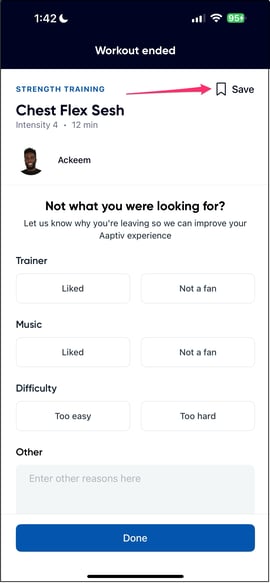
Another option to save is after the workout is complete, Tap the bookmark/Save option in the upper right hand corner.
To find your saved workout lists, tap the 3 lines in the upper left hand corner, then tap Saved Workouts. 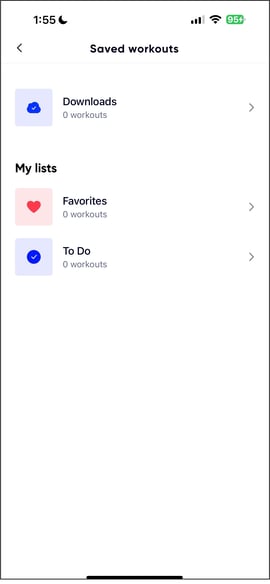
Here you will see two sets of saved workouts:
1. Downloads: these workouts are downloaded to your phone and available to you at any time.
2. My Lists: Here you will see two default lists: Favorites and To Do. When saving a workout, however, you have the opportunity to create a unique list just for you such as "Legs" or "Friday Workouts" or "Meditations I Love!"
To remove a workout from a saved list, pull up the workout then tap the bookmark icon to deactivate. Once deactivated, it will not appear in that list any longer.